
Download SimilarImageFinder – Fast Duplicate Photo Scanner
Overview
SimilarImageFinder is a lightweight yet powerful utility designed to scan your computer for duplicate and visually‑similar images. Photo enthusiasts, designers, and anyone with a sprawling image library will instantly recognize the value of a tool that can clean up redundant files without compromising the original collection. The application works by analysing visual fingerprints rather than relying solely on file names or sizes, which means it can spot copies that have been renamed, resized, or slightly edited.
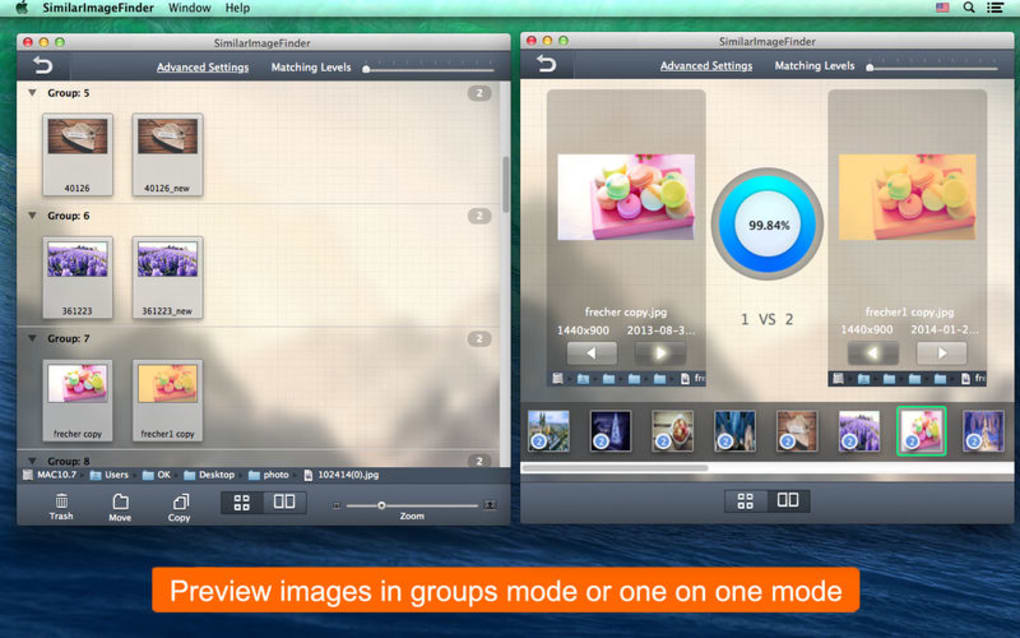
Its low‑resource footprint ensures that even older PCs can run a full‑disk scan without noticeable slowdown. Once the scan is complete, SimilarImageFinder presents results in an intuitive grid view, allowing you to compare thumbnails side‑by‑side and decide which files to keep, delete, or move to a separate folder. The software also supports batch actions, so you can delete hundreds of duplicates with a single click.
Security‑conscious users will appreciate that the program runs locally; no images are uploaded to the cloud, and the scanning process never requires an internet connection. Whether you are cleaning up a personal photo archive, managing assets for a small business, or preparing a media library for backup, SimilarImageFinder offers a fast, secure, and user‑friendly solution to keep your image collection unique and well‑organized.
Core Features that Set SimilarImageFinder Apart
- Visual fingerprint algorithm that detects similarity even after cropping, resizing, or minor color adjustments.
- Fast multi‑threaded scanning engine that utilizes idle CPU cores while keeping memory usage under 150 MB.
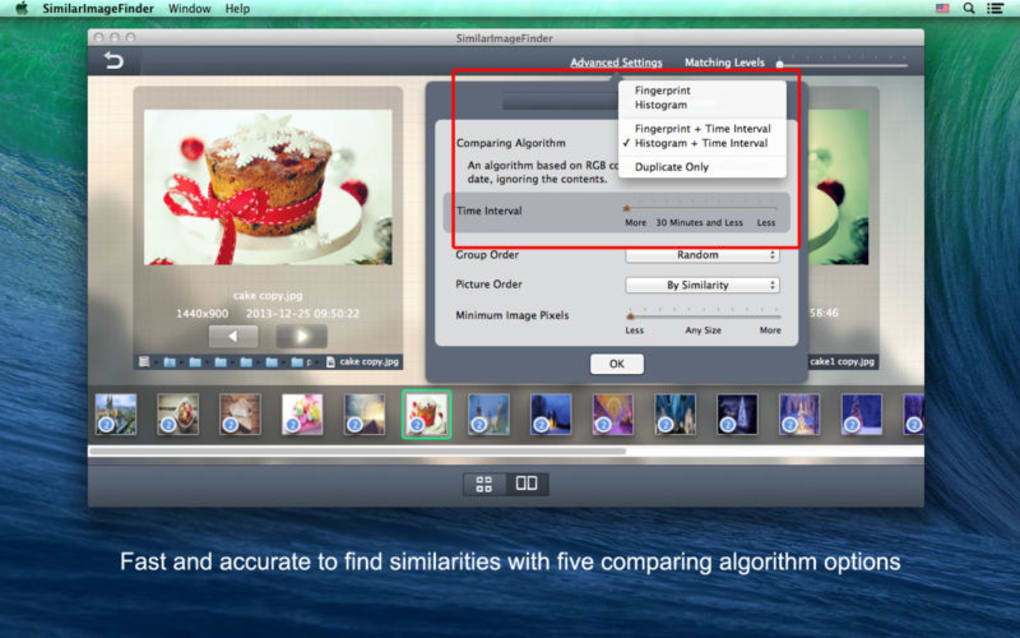
- Customizable similarity thresholds – from exact duplicates to loosely similar images.
- Rich thumbnail preview with side‑by‑side comparison and detailed file information (resolution, size, date).
- Batch actions: delete, move, or mark files as “keep” in a single operation.
- Support for popular image formats: JPEG, PNG, BMP, GIF, TIFF, and RAW files.
- Exclusion filters to skip specific folders, file types, or size ranges.
- Automatic backup option that creates a temporary copy before any destructive action.
- Portable version available for USB deployment without installation.
- Regular free updates that improve detection accuracy and add new format support.
Each of these features has been crafted with the everyday user in mind. The visual fingerprint algorithm is the heart of SimilarImageFinder; it extracts a compact representation of each image’s visual content, enabling rapid comparison across thousands of files. This approach outperforms traditional hash‑based duplicate finders, which only catch identical byte‑for‑byte copies.
The multi‑threaded engine means a full‑hard‑drive scan of 50 GB of photos typically finishes in under 10 minutes on a mid‑range laptop, while the memory footprint stays low enough not to interfere with other applications. Users can fine‑tune the similarity threshold: set it to 100 % for exact copies or lower it to 70 % to catch images that share the same scene but differ in lighting or slight edits. The UI presents results in a clean grid, and hovering over a thumbnail reveals EXIF data, helping you make informed decisions.
Batch actions eliminate the tedious “one‑by‑one” deletion process, which is especially valuable for large libraries. The exclusion filters let power users streamline scans by ignoring system folders or temporary caches, while casual users benefit from the simple “Scan Now” button that runs with sensible defaults. Finally, the portable edition allows you to carry the scanner on a flash drive and run it on any Windows PC without admin rights, perfect for on‑the‑go clean‑ups.
Installation, Usage & System Compatibility
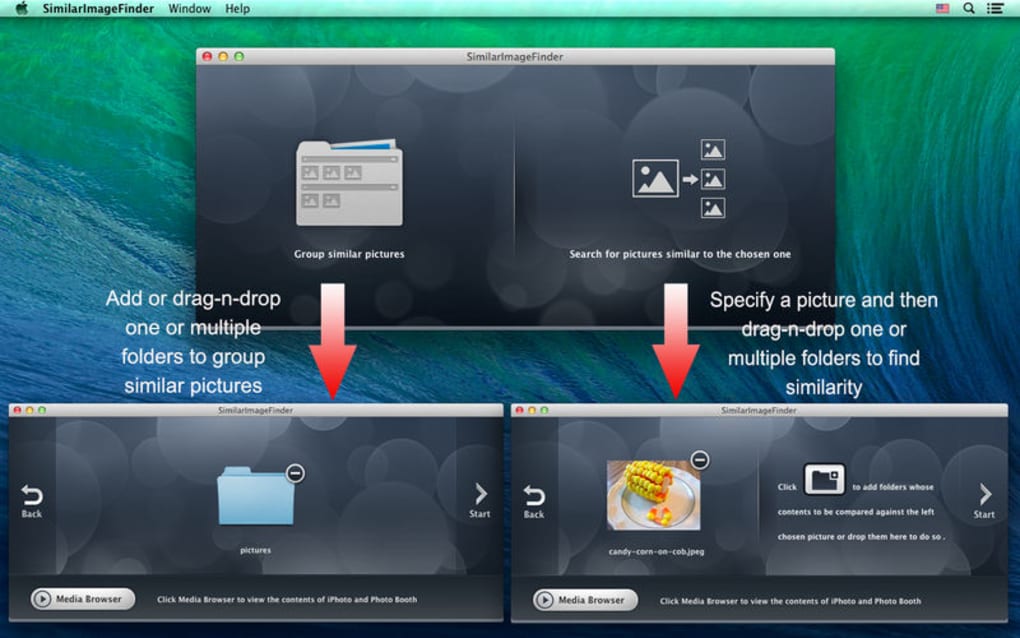
Getting started with SimilarImageFinder is intentionally straightforward. After you download the installer from the official website, run the .exe (Windows) or .dmg (macOS) file and follow the on‑screen prompts. The installer is a single‑click process: accept the license agreement, choose an installation folder (the default works for most users), and click “Install”. For those who prefer not to install, the portable zip package can be extracted to any location and launched directly from the executable. Once the application opens, the main window presents a clear three‑step workflow: select folders, configure scan options, and review results.
Step 1 – Choose Scan Locations: Click “Add Folder” and navigate to the directories that contain your images. You can add multiple folders, and the program will treat them as a single search space. A handy “Include sub‑folders” checkbox ensures that deep directory trees are scanned automatically.
Step 2 – Set Scan Parameters: Here you decide the similarity threshold (default 90 %), enable or disable RAW support, and optionally apply exclusion filters. Advanced users may enable “High‑Performance Mode” to push the CPU usage up to 80 % for even faster scans, though this can be throttled on laptops to preserve battery life.
Step 3 – Run the Scan: Press “Start Scan”. The progress bar updates in real time, showing the number of files processed and estimated time remaining. As duplicates are identified, they appear in the result pane grouped by similarity clusters. Clicking a cluster expands the thumbnails, letting you compare each image side‑by‑side.
After reviewing, you can select individual files or entire clusters and click “Delete”, “Move to Folder”, or “Mark as Keep”. If you opt for deletion, the software prompts a final confirmation and moves the files to the Windows Recycle Bin (or macOS Trash) so you can recover them if needed.
Supported Operating Systems
- Windows 10, Windows 11 (64‑bit)
- macOS 10.15 Catalina and later (Intel & Apple Silicon)
- Linux (Ubuntu 20.04+, Fedora 33+, via AppImage)
System requirements are modest: a 1 GHz processor, 2 GB RAM, and at least 100 MB of free disk space for temporary files. Because the scanning algorithm runs locally, no internet connection is required after the initial download. Regular updates are delivered through an integrated updater that checks for new versions once a week, ensuring you always have the latest detection improvements and bug fixes without manually downloading patches.
Pros, Cons, Frequently Asked Questions & Final Verdict
Pros
- Highly accurate visual similarity detection.
- Low CPU and memory usage during scans.
- Intuitive UI with thumbnail previews.
- Flexible similarity threshold and exclusion filters.
- Supports a wide range of image formats, including RAW.
- Portable version available for on‑the‑go use.
- Free updates and active developer support.
Cons
- No built‑in cloud backup integration.
- Limited to Windows, macOS, and Linux – no mobile app.
- Advanced settings may be overwhelming for absolute beginners.
Frequently Asked Questions
Can SimilarImageFinder detect images that have been edited (e.g., color corrected)?
Yes. The visual fingerprint algorithm focuses on structural patterns, so minor edits like color correction, cropping, or slight resizing are still recognized as similar.
Is there a limit to the number of files the tool can scan?
There is no hard‑coded limit. The only constraints are your system’s RAM and storage space for temporary data. In practice, users have scanned libraries of over 200,000 images without issues.
How does the portable version differ from the installed one?
The portable version contains the same core engine but does not write registry entries or require admin rights. It is ideal for use on public computers or when you want to keep the software on a USB drive.
Does the software permanently delete files?
No. Deletions are sent to the system recycle bin (or trash), giving you a safety net to restore files if you make a mistake.
Is there a paid version with extra features?
Currently SimilarImageFinder is offered completely free. Future premium modules may be introduced, but the core duplicate‑finding functionality will remain free.
After testing SimilarImageFinder on a mixed library of JPEGs, PNGs, and RAW files, I can confidently say it delivers on its promises. The visual similarity detection caught dozens of edited copies that other tools missed, and the batch‑delete workflow saved me hours of manual work. While a mobile companion would be nice, the desktop experience is polished and efficient. For anyone looking to declutter their photo collection without risking accidental loss, this tool is a must‑have.
Conclusion & Call to Action
SimilarImageFinder stands out as a fast, secure, and highly accurate solution for anyone who wants to keep their image library tidy. Its low‑resource design means you can run a comprehensive scan on older hardware, while the visual fingerprint technology ensures that even subtly edited duplicates are detected. The combination of an intuitive interface, powerful batch actions, and generous free updates makes it a compelling choice over generic file‑size or hash‑based duplicate finders. If you’re ready to reclaim valuable disk space and maintain a unique photo collection, download SimilarImageFinder today and start cleaning up with confidence.







